LangChain
围绕LLMs(大预言模型)建立的一个框架。LangChains自身并不开发LLMs,它的核心理念是为各种LLMs实现通用的接口,把LLMs相关的组件“链接”在一起,简化LLMs应用的开发难度,方便开发者快速地开发复杂的LLMs应用。
主要功能:
- Prompts 优化提示词(提示词工程)
- Models 调用各类模型
- History 管理会话历史记录(记忆)
- Indexes 管理和分析各类文档
- Chains 构建功能的执行链条
- Agent 构建智能体
LangChain 是一个LLM相关业务功能的集大成者,是一个Python的第三方库,提供了各种功能的API。
pip install langchain langchain-community dashscope chromadb langchain-ollama
- langchain: 核心包
- langchain-community: 社区支持包,提供了更多的第三模型调用(阿里云百炼)
- langchain-ollama:ollama支持包,支持调用ollama托管部署的本地模型
- dashscope:阿里云通义千问的Python SDK
- chromadb:轻量向量数据库
LangChain目前支持三种类型的模型:LLMs(大预言模型)、Chat Models(聊天模型)、Embeddings Models(嵌入模型)
- LLMs: 技术范畴的统称,指基于大参数量、海量文本训练的Transformer架构模型,核心能力是理解和生成自然语言,主要服务于文本生成场景
- 聊天模型:应用范畴的细分,是专为对话场景优化的LLMs,核心能力是模拟人类对话的轮次交互,主要服务于聊天场景
- 文本嵌入模型:文本嵌入模型接收文本作为输入,得到文本的向量
LLM 大语言模型
from langchain_ollama import OllamaLLM

model = OllamaLLM(model="qwen3:4b")
res = model.invoke(input = "请介绍一下你自己")
print(res)
from langchain_community.llms.tongyi import Tongyi

model = Tongyi(model="qwen-max")
res = model.stream(input = "你是谁呀")

for chunk in res:
    print(chunk, end = "", flush = True)
调用模型的方法:
- invoke:调用模型,一次性返回完整结果
- stream:调用模型,逐段流式输出
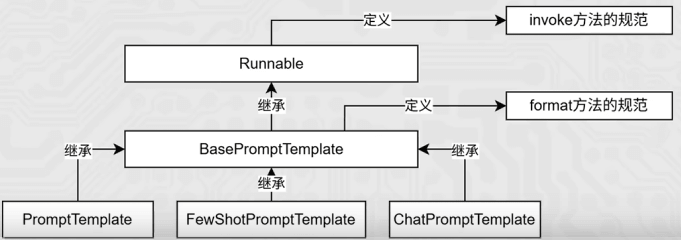
两个方法是新版LangChain中基于Runnable接口的通用核心方法。绝大多数组件(提示词模板、链、向量检索、工具调用等)都支持。这也是LangChain设计的核心统一范式。
Chat Models 聊天模型
- AIMessage:AI输出的消息,可以针对问题的回答。(OpenAI库中的assistant角色)
- HumanMessage:人类消息,用户信息。由人给出的信息发送给LLMs的提示信息,比如“实现一个快速排序方法”。(OpenAI库中的user角色)
- System Message:可以用于指定模型具体所处的环境和背景,如角色扮演等。可以在这里给出具体指示,比如“作为一个代码专家”,或者“返回json格式”。(OpenAI库中的system角色)
from langchain_community.chat_models.tongyi import ChatTongyi
from langchain_core.messages import SystemMessage, HumanMessage, AIMessage

model = ChatTongyi(model="qwen3-max")

messages = [
    SystemMessage(content="你是一位与人交往风趣幽默的同事,情商超高。"),
    HumanMessage(content="讲个笑话"),
    AIMessage(content="为什么程序员喜欢在沙滩上工作?因为那里有很多“代码”!"),
    HumanMessage(content="我没get到点,帮我解读下")
]

res = model.stream(messages)
for chunk in res:
    print(chunk.content, end="", flush=True)
在俩天模型,迭代输出时候需要注意chunk.centent,与大语言模型有一点不同。另外消息可以简写:
from langchain_community.chat_models.tongyi import ChatTongyi

model = ChatTongyi(model="qwen3-max")
messages = [
    # (角色,内容) 角色可以是system、human、ai,分别代表系统、用户和AI
    ("system", "你是一位与人交往风趣幽默的同事,情商超高。"),
    ("human", "讲个笑话"),
    ("ai", "为什么程序员喜欢在沙滩上工作?因为那里有很多“代码”!"),
    ("human", "我没get到点,帮我解读下")
]

res = model.stream(messages)
for chunk in res:
    print(chunk.content, end="", flush=True)
其区别也优势在于,第一种是静态的,一步到位,直接得到了Message类对象。第二种动态的,在运行时由LangChain内部机制转换为Message类对象。简写形式避免导包,写起来简单,支持内部填充{变量}占位,可在运行时填充具体值。
Embeddings Models 文本嵌入模型
特点:将字符串作为输入,返回一个浮点数的列表(向量)。在NLP中,Embedding的作用就是将数据进行文本向量化。
from langchain_community.embeddings import DashScopeEmbeddings

#创建模型对象,不传入model默认用的是text-embedding-v1
model = DashScopeEmbeddings()

# embed_query, embed_documents
print(model.embed_query("豆浆油条"))
print(model.embed_documents(["豆浆油条", "牛奶面包", "咖啡蛋挞"]))
LangChain基础API:
| 方式 | LLMs大语言模型 | 聊天模型 | 文本嵌入模型 |
| ———- | ————————————————– | ————————————————————- | ————————————————————– |
| 阿里云千问 | from langchain_community.llms.tongyi import Tongyi | from langchain_community.chat_models.tongyi import ChatTongyi | from langchain_community.embeddings import DashScopeEmbeddings |
| Ollama本地模型 | from langchain_ollama import OllamaLLM | from langchain_ollama import ChatOllama | from langchain_ollama import OllamaEmbeddings |
| 方法 | invoke批量/stream流式 | invoke批量/stream流式 | embed_query 单次转换/embed_documents批量转换 |
通用Prompt(zero-shot)
PromptTemplate: 通用提示词模板,支持动态注入信息。
from langchain_core.prompts import PromptTemplate
from langchain_community.llms.tongyi import Tongyi

prompt_template = PromptTemplate.from_template("我的邻居姓{lastname},刚生了{gender}, 你帮我起个名字")

#调用.format方法注入信息
prompt_text = prompt_template.format(lastname="吉", gender="女儿")
model = Tongyi(model="qwen-max")
#res = model.invoke(input = prompt_text)
#print(res)

chain = prompt_template | model
res = chain.invoke(input={"lastname":"喜", "gender":"儿子"})
print(res)
FewShot提示词模板
FewShotPromptTemplate :支持基于模板注入任意数量的示例信息。类对象构建需要5个核心参数:
- example_prompt: 示例数据的提示词模板
- examples: 示例数据,list,内套字典
- prefix: 组装提示词,示例数据前内容
- suffix: 组装提示词,示例数据后内容
- input_variables: 列表,注入的变量列表
from langchain_core.prompts import FewShotPromptTemplate, PromptTemplate
from langchain_community.llms.tongyi import Tongyi

#示例的模板
example_template = PromptTemplate.from_template("单词: {word}, 反义词: {antonym}")

#示例的动态数据注入, 要求是list内套字典,字典的key要和示例模板中的变量一致
examples = [
    {"word": "高兴", "antonym": "难过"},
    {"word": "大", "antonym": "小"},
    {"word": "快", "antonym": "慢"}
]

few_shot_prompt = FewShotPromptTemplate(
    example_prompt=example_template,                         # 示例数据的模板 (注意:字段名为 example_prompt)
    examples=examples,                                        # 示例数据(用来注入动态数据的), list内套字典
    prefix="告诉我单词的反义词,我提供如下的示例:",              # 前缀文本,放在示例数据前面
    suffix="基于前面的示例,请提供{input_word}的反义词。",       # 后缀文本,放在示例数据后面
    input_variables=["input_word"]                            # 输入变量列表
)

prompt_text = few_shot_prompt.invoke(input={"input_word": "漂亮"}).to_string()
print(prompt_text)

model = Tongyi(model="qwen-max")
ans = model.invoke(input=prompt_text)
print(ans)
| 方式 | LLMs大语言模型 | 聊天模型 | 文本嵌入模型 |
| ———- | ————————————————– | ————————————————————- | ————————————————————– |
| 阿里云千问 | from langchain_community.llms.tongyi import Tongyi | from langchain_community.chat_models.tongyi import ChatTongyi | from langchain_community.embeddings import DashScopeEmbeddings |
| Ollama本地模型 | from langchain_ollama import OllamaLLM | from langchain_ollama import ChatOllama | from langchain_ollama import OllamaEmbeddings |
| 方法 | invoke批量/stream流式 | invoke批量/stream流式 | embed_query 单次转换/embed_documents批量转换 |
ChatPromptTemplete
ChatPromptTemplate:支持注入任意数量的历史会话信息。
from langchain_core.prompts import ChatPromptTemplate, MessagesPlaceholder
from langchain_community.chat_models.tongyi import ChatTongyi

chat_prompt_template = ChatPromptTemplate.from_messages(
    [
        ("system", "你是一位与人交往风趣幽默的同事,情商超高。"),
        MessagesPlaceholder(variable_name="history"),
        ("human", "有个同事心情不好,你帮我安慰他")
    ]
)

history_data = [
    ("system", "你是一位与人交往风趣幽默的同事,情商超高。"),
    ("human", "有个同事心情不好,你帮我安慰他"),
    ("ai", "哦,发生什么事了?要不要跟我说说?"),
    ("human", "他被老板批评了"),
    ("ai", "被老板批评了确实挺难受的,不过没关系,大家都会有被批评的时候。重要的是从中吸取经验,下次做得更好!")
]

#StringPromptValue
prompt_text = chat_prompt_template.invoke(input={"history": history_data}).to_string()

model = ChatTongyi(model="qwen3-max")
ans = model.invoke(input=prompt_text)
print(ans.content, type(ans))